
The Easy Way to Upload a Custom Font to Squarespace
Do you have a specific brand font that “must” be used on your website? Are you creating a website in another language with accents or a different alphabet? Or, maybe you want to add something to give it the right tone or personality?
Fonts are definitely an important part of your website, both for design and use. One of the reasons that I loved Squarespace from the start was that they had built in a large (and great) selection of ready to use fonts. And for most sites, this was perfect – but sometimes you need a custom font.
Until recently this meant adding files & code to your Custom CSS area. Now Squarespace has introduced a much easier way to add custom fonts in version 7.1.
Uploading a Custom Font in Site Styles
Accepted font formats:
.otf
.ttf
.woff
.woff2
Step 1: Upload Your Font
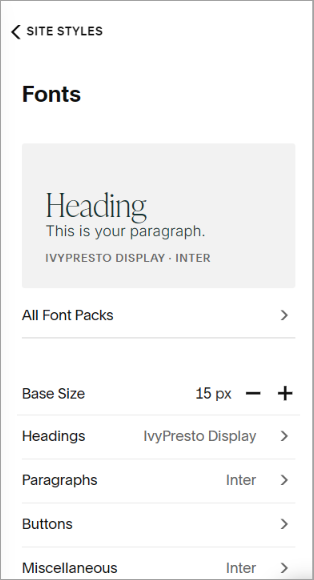
From any page on your website, click the paintbrush icon to access Site Styles
Click on the arrow > next to Fonts
Click on either Headings, Paragraphs, Buttons or Miscellaneous
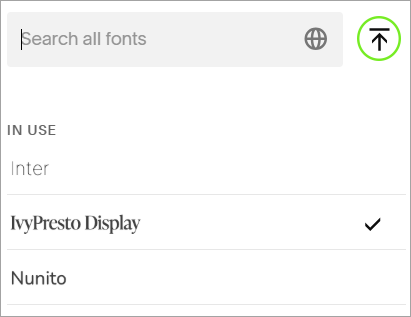
Click on the current font name, then click the upload icon ⬆ next to the search box
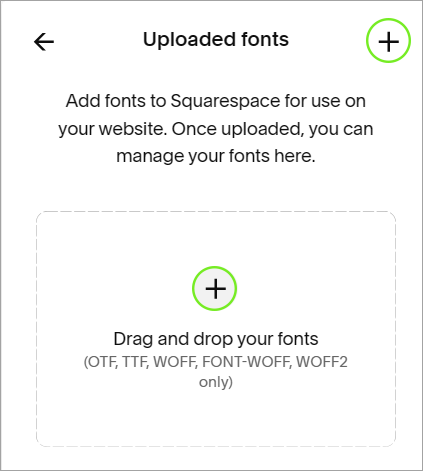
Click the plus icon + to upload your custom font
Now your font is ready to be used! If you want to use different weights of the font or the italics version, you will need to upload each of those as well.
Site Styles > Fonts
Click on upload icon
Add font
Step 2: Use Your Font
Head back to the Fonts page in Site Styles and choose the font style you want to change. You can choose Headings, Paragraphs, Buttons, Miscellaneous or Assign Styles.
Click on the current font name to bring up your font list. Your custom font will be located under Uploaded fonts.
Choose your font and save!
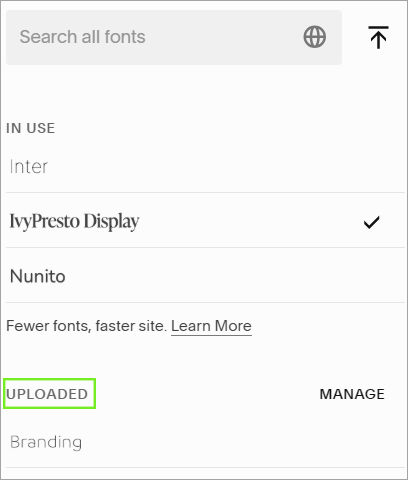
Your uploaded font in your font list
Deleting a Custom Font
Do you have too many fonts on your website (see info below)? Do you want to get rid of a custom font?
Check to see whether you are currently using the font anywhere on your website. If you are using it, change the font out for another of your site fonts.
In Site Styles > Fonts, click on Headings, Paragraphs, Buttons, Miscellaneous
Click on the font name, then click MANAGE next to the uploaded fonts
Click on the X next to the font name you want to delete
Important Considerations for Using Custom Fonts
Licenses
*Make sure you review your font license before you use it on your website.
There are so many different font licenses out there, so make sure you understand what you are allowed to use your font to do.
Some licenses will only let you use the font for desktop, meaning things like creating invitations, flyers or logos. Others will let you use it on your website, but only for a certain number of views per month. There are also fonts that are only free for personal use and need special permission to use on a commercial site.
My preference is to use fonts that are free to use on any kind of website and don’t involve tracking the numbers of views, but depending on your needs this may not be possible.
Legibility
Back in my last business, when I designed wedding invitations, I had what I called “the grandma rule” for picking fonts. This meant that if someone’s grandma couldn’t read the invite, then it didn’t work as the main invite font. It was fine to have swirly script fonts for the bride or groom’s names because those were big and made to stand out. But, the date and place needed to be easy to read - for everyone.
For websites, legibility & accessibility is also extremely important. You want every single one of your visitors to be able to read your text. So, if you are adding a script or calligraphy font (or any other font that may be more difficult to read) consider adding it only to the headings or maybe just as a highlight in a few places to add personality. More complex fonts are easier to read in short bursts.
Generally it’s best to use 1 to 3 fonts maximum on your site to keep it from looking cluttered. This also helps with the next consideration.
Page Speed
You have only a few seconds before someone bounces from your site, so keep your page speed in mind when adding custom fonts. Every font that you have on your page adds to the page load. So, you may want to choose a single variant (weight etc.) of a font instead of using several different weights or the italic version.
Ready to add a custom font to your website, but don’t know where to get one? You may want to try Google Fonts or Font Squirrel for fonts that are free for commercial use.